
In October 2026, the WordPress and web security community faced an unprecedented crisis — a critical PHP vulnerability nicknamed “PHP2Shell” that doesn’t live inside WordPress plugins or themes, but inside the very engine that powers 70–75% of the internet: PHP itself. The vulnerability was first publicly detailed by Wiz Research in their technical disclosure blog, and the official patch was published on PHP.net’s security advisory page.
Tracked under CVE-2026-109618 and CVE-2026-109619, this vulnerability was officially disclosed by Wiz Research on October 21, 2026, with both flaws rated CVSS 9.2 — Critical. Within hours, the fallout was global:
- Dutch government portal Overheid.nl, Dutch Parliament sites, DigiD, and the Dutch National Cyber Security Centre went offline
- Finland’s state IT center Valtori shut down government web services
- Germany’s ITZBund (federal IT provider), Mainz.de, and Rhineland-Palatinate government agencies pulled websites down
- France’s Interior Ministry suspended local government administration sites
- UK councils (Bristol, Lambeth, Barnet) and the Metropolitan Police showed error messages after NCSC alerts
- Swiss web hosting provider Cyon took servers offline, breaking thousands of customer sites
- BambooHR, Bullhorn, Something Awful, and other platforms went temporarily dark
- Wikipedia (MediaWiki) had to be taken offline
- KNVB (Dutch football association) and Port of Rotterdam websites went down
- Dutch RIVM public health institution websites pulled offline
- Danish national school communication platform affected
- The White House issued statements assessing impact
If you own, build, or manage WordPress websites, this is a critical moment. This comprehensive guide covers every single thing you need to know, including the full list of affected sites, the technical root cause, step-by-step patch instructions, and the consequences of ignoring this threat.
URGENT: As of October 23, 2026, active exploitation of PHP2Shell is already being observed worldwide. Every unpatched hour increases your risk of a complete WordPress site takeover.
What Is the PHP2Shell Vulnerability? (CVE-2026-109618 and CVE-2026-109619)
PHP2Shell is the collective name given to a group of critical memory-safety vulnerabilities in the core PHP engine. These flaws allow attackers to execute arbitrary code and read sensitive memory on vulnerable PHP servers — without any authentication or user interaction.
Quick Facts: The October 2026 PHP Vulnerability at a Glance
| Property | Details |
| CVE IDs | CVE-2026-109618 and CVE-2026-109619 |
| Severity Rating | CVSS 4.0 Score: 9.2 / 10 (CRITICAL) |
| Discoverer | Wiz Research (Sagi Tzadik, Shir Tamari, Nir Ohfeld, Tomer Schwartz) |
| AI Tools Used | Google Gemini 4 Argon, OpenAI GPT-5.6 Sol, Wiz Atlas |
| Patch Date | October 21, 2026 (14:00 UTC) |
| Attack Vector | Remote (unauthenticated, no user interaction) |
| Attack Complexity | Low to Medium |
| Affected Software | PHP core engine — all versions since PHP 5.4 (2012) |
| Impact | Remote Code Execution (RCE) + Heartbleed-style memory disclosure |
| Internet Impact | ~70% of all websites potentially vulnerable |
| Primary CMS Targets | WordPress, Drupal, Joomla, MediaWiki, Magento |
| Nickname | PHP2Shell |
| Historical Comparison | Heartbleed (2014), Log4Shell (2021) |
What Does “PHP2Shell” Actually Mean?
The name “PHP2Shell” reflects the attack chain: a hacker exploits a flaw in PHP to drop a “shell” on the victim server. A “shell” in hacker terms means command-line access, which essentially means owning the server. Once attackers have shell access, they can:
- Steal databases (customer records, passwords, credit card data)
- Install malware, ransomware, cryptominers, or botnets
- Deface websites with their own content or propaganda
- Pivot to other servers in the hosting environment
- Hold your business hostage for ransom
- Use your server to attack other targets (DDoS, spam, phishing)
- Steal customer identities and sell them on the dark web
Why This Vulnerability Exists: The Root Cause Explained
Many people wonder: “How did a flaw this serious survive in PHP for over a decade?” Here’s the honest answer.
1. PHP’s Age and Architectural Decisions
PHP was created in 1994 by Rasmus Lerdorf as a personal set of Perl scripts. It evolved rapidly without a formal design document. Many of PHP’s core memory management decisions were made in the 1990s and early 2000s — long before modern memory safety concepts existed.
PHP2Shell exploits assumptions baked into PHP’s architecture over a decade ago, specifically around how PHP handles fatal errors (particularly out-of-memory errors) during request processing.
2. The Specific Flaw: Memory Mismanagement After Fatal Errors
When PHP encounters a fatal error mid-request:
- The current request is terminated
- PHP’s per-request heap (memory) is destroyed
- BUT certain global pointers may still reference that freed memory
- The next request handled by the same worker interacts with these dangling pointers
- This creates use-after-free vulnerabilities attackers can weaponize
3. Why Nobody Found It Before 2026
The vulnerable code has existed since PHP 5.4 (2012). Why did it take 14 years to find?
Because exploiting it required an extraordinarily complex chain of steps:
- Chaining multiple bugs together
- Precise control of PHP’s memory layout
- Adapting to PHP version differences
- Overcoming OS-level memory protections
- Reliable exploitation across different web server configurations
Pre-AI, this work would require a world-class security team months of effort per target. It was simply “too complex to be practical” — until AI changed that calculation entirely.
4. Why PHP Is Especially Vulnerable to These Types of Bugs
PHP uses a shared-nothing architecture, meaning each request is theoretically isolated. However:
- PHP workers (processes) are reused across requests for performance
- Global state can persist between requests on the same worker
- OPcache (shared memory cache) persists across all workers
- When memory management goes wrong, data leaks between unrelated requests from different users
This is exactly how the memory disclosure in PHP2Shell works. Attacker A triggers an error that leaves data accessible to a later request from Attacker A, exposing memory from User B’s unrelated request.
5. The PHP Foundation’s Response
The PHP Foundation has acknowledged these issues go deeper than the two patched CVEs and has committed to:
- A comprehensive audit of PHP’s error handling
- Modernizing memory safety across the codebase
- AI-assisted vulnerability research going forward
- Stricter coding standards for new contributions
How the PHP2Shell Vulnerability Works (Technical Deep Dive)
The Four Underlying Bugs
Wiz Research identified four distinct exploitable bugs under the two CVE umbrellas, each with devastating impact:
Bug #1: Upload-Progress Unserializer Use-After-Free (CVE-2026-109618)
Where: PHP’s Session module, upload-progress feature What goes wrong:
- The decoder stores request-owned bookkeeping in BG(unserialize)
- A fatal allocation failure destroys the request heap but leaves the global state
- A later request consumes attacker-reclaimed memory as live bookkeeping
- Result: Pre-authentication RCE on WordPress, Drupal, Joomla
Bug #2: Remote Process-Memory Disclosure (CVE-2026-109618)
The Heartbleed-style flaw:
- PHP parses multipart requests during startup, before full module init
- An OOM error leaves PS(id) pointing to freed memory
- A later multipart request causes PHP to URL-encode reclaimed heap contents into PHPSESSID cookies
- Attackers read raw server memory containing passwords, API keys, SSL certificates, session data from OTHER USERS
- Works even if the application never calls session_start()
Bug #3: Fatal-Error Backtrace Use-After-Free (CVE-2026-109619)
- PHP retains error backtraces in EG(last_fatal_error_backtrace)
- OOM errors destroy the request heap without clearing this global
- Next request accesses dangling pointer before reinitialization
- Result: Cross-request use-after-free leading to RCE on Drupal
Bug #4: OPcache Type Confusion (CVE-2026-109619)
- OPcache persists compiled PHP in shared memory
- Allocation failure during zend_accel_script_persist() creates mismatched state
- Workers resolve stale metadata to wrong-type pointers
- Result: Cross-worker type confusion leading to RCE on WordPress
Why Standard Logging Misses PHP2Shell Attacks
Because exploitation runs below the application layer, WordPress logs show little evidence. Instead, defenders must monitor for:
- Unusual multipart POST requests
- Memory-limit errors in PHP error logs
- Repeated HTTP 500 responses
- Oversized or malformed PHPSESSID response cookies
- Unexplained PHP worker churn (PHP-FPM restarts)
- Sudden server load spikes without matching traffic
How PHP2Shell Specifically Affects WordPress Websites
Why WordPress Is Especially Vulnerable
WordPress is uniquely exposed to PHP2Shell for several reasons:
1. WordPress Is Built Entirely on PHP
Every single page view on a WordPress site triggers dozens or hundreds of PHP execution cycles. More PHP execution means more attack surface.
2. 43% of the Web Runs WordPress
With approximately 43% of all websites using WordPress, attackers get massive ROI for every working PHP2Shell exploit. Expect WordPress to be the number one target for mass automated attacks. If your WordPress site is your primary business asset, our WordPress SEO services guide also explains why WordPress-specific maintenance is critical for long-term growth.
3. WordPress’s Plugin and Theme Ecosystem Amplifies Risk
- Over 60,000 plugins and 10,000 themes
- Many plugins process file uploads, forms, and session data — the exact code paths PHP2Shell abuses
- Even one vulnerable plugin can trigger memory-corruption conditions that enable PHP2Shell exploitation
- Legacy themes and plugins still support PHP 7.x and older — now permanently vulnerable
4. Shared Hosting Multiplies the Blast Radius
Most WordPress sites run on shared hosting (Bluehost, HostGator, GoDaddy, Hostinger, Namecheap). On shared servers:
- Hundreds or thousands of WordPress sites share the same PHP workers
- A single compromise can expose data from unrelated neighboring sites
- Memory disclosure can leak secrets from OTHER customers on the same server
5. WooCommerce Stores Equal High-Value Targets
Over 5 million WooCommerce stores process payments, customer data, and personal information. PHP2Shell on a WooCommerce site means direct access to:
- Credit card data (if stored or in transit)
- Customer PII (names, addresses, emails, phones)
- Order history
- Admin credentials
- API keys for Stripe, PayPal, Square
6. Elementor, Divi, and Page Builder Sites Equally Affected
Page builders (Elementor, Divi, Beaver Builder, WPBakery) run on PHP. They do not provide any protection against PHP2Shell. Many Elementor sites also use the vulnerable Session module heavily.
WordPress-Specific Attack Scenarios
Here’s what attackers can do to a vulnerable WordPress site:
- Full site takeover — Add themselves as admin, change all passwords, lock you out
- SEO spam injection — Insert hidden pharma, casino, or counterfeit product links
- Japanese SEO spam — Create thousands of foreign-language spam pages
- Drive-by malware distribution — Serve malware to your visitors
- Credit card skimming (Magecart-style attacks) — Inject JavaScript to steal payment data on WooCommerce checkouts
- Cryptojacking — Mine cryptocurrency using your server resources
- Phishing page hosting — Create fake login pages on your domain
- Email relay for spam — Send millions of spam emails through your server
- Botnet enlistment — Use your server to attack others
- Ransomware deployment — Encrypt your site and demand payment to restore
Real Websites and Organizations Affected by PHP2Shell (Confirmed List)
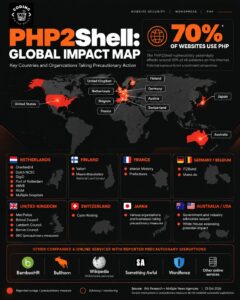
This is the comprehensive, confirmed list of sites and organizations that were taken offline or compromised due to the October 2026 PHP vulnerability.
 .
.
Netherlands (Most Affected Country)
The Netherlands saw the most disruption due to heavy reliance on PHP-based government systems:
- Overheid.nl — Dutch national government portal
- Dutch National Cyber Security Centre (NCSC-NL) — Took their own site offline as precaution
- Dutch Parliament websites (Tweede Kamer / House of Representatives systems)
- DigiD — National digital identity system
- RIVM — Dutch public health institution (multiple sites)
- Port of Rotterdam — One of Europe’s largest ports
- KNVB — Royal Dutch Football Association
- Numerous municipal portals across Dutch cities
- Multiple Dutch hospitals
- NotuBiz — Government meeting platform
- Various universities across the Netherlands
Finland
- Valtori — The Finnish state’s central IT provider (brought down most government web services)
- Maanmittauslaitos — National Land Survey of Finland
- Numerous government public network services
- Multiple ministries and agencies
France
- Ministry of the Interior — Suspended local government administration sites
- Multiple French prefectures
- Various government portals
Germany
- ITZBund — Germany’s federal IT provider (took several federal websites down)
- Mainz.de — City of Mainz official website
- Rhineland-Palatinate state government websites
- Multiple federal and state agencies
Belgium
- Various government websites (precautionary shutdowns)
Austria
- University of Vienna webmail and websites
- Multiple university systems
- News outlets temporarily offline
Switzerland
- Cyon — Major Swiss web hosting provider took servers offline, breaking thousands of customer sites
- Customer portal, webmail, and hosting services all affected
- Federal Councilors and Soldiers websites affected
- Swiss Federal Office for Cybersecurity issued warnings
Denmark
- National school communication platform affected
- Various education sector services
United Kingdom
- Metropolitan Police (Met Police) website affected
- Bristol Council — Error messages displayed
- Lambeth Council — Error messages displayed
- Barnet Council — Error messages displayed
- Multiple other local councils pulled offline following NCSC alerts
United States
- The White House — Officially assessing potential impact
- Various federal and state systems under evaluation
Private Companies and Platforms
- BambooHR — HR software platform (temporarily took services offline to apply patches, confirmed in official statement)
- Bullhorn — Staffing/recruiting platform
- Something Awful — Internet forums (took forums offline)
- Wordfence — Took several of their own services offline temporarily while deploying mitigations
- Numerous WordPress agencies, SaaS providers, and staffing firms
Open-Source Projects
- Wikipedia (MediaWiki) — Temporarily affected
- All Wikimedia Foundation-supported systems that use PHP
Industries Hit Hardest
- Hospitals and healthcare systems (Netherlands, Germany)
- Government services (worldwide)
- Universities (Netherlands, Austria, Germany)
- E-commerce / WooCommerce stores (ongoing)
- Media and news organizations
- Staffing and HR platforms (BambooHR, Bullhorn)
- Web hosting providers (Cyon in Switzerland)
- Transportation and logistics (Port of Rotterdam)
- Sports federations (KNVB)
Scale in Numbers
- 70% of all websites potentially vulnerable (approximately 1.3 billion websites)
- 43% of all websites run WordPress (approximately 800 million sites potentially affected)
- Approximately 50% of PHP sites were running End-of-Life PHP versions (no simple patch available)
- Thousands of individual sites taken offline across the EU alone in the first 24 hours
- Over 100 confirmed government agencies affected globally
The lesson is clear. If government agencies, Fortune 500 companies, and billion-dollar organizations are pulling their sites offline, your WordPress site is not immune. Act now.
The AI Breakthrough: How Gemini and GPT Discovered PHP2Shell
Perhaps the most historic aspect of PHP2Shell is how it was discovered.
The flawed code existed in PHP for over a decade, but exploitation was considered too complex to be practical. Wiz Research changed that calculation using frontier AI models:
- Google Gemini 4 Argon — The primary discovery and exploit-development AI
- OpenAI GPT-5.6 Sol — Secondary analysis and verification
- Wiz Atlas — Wiz’s own AI vulnerability researcher
[IMAGE PLACEHOLDER 10 — Raluca Ada Popa Quote Card] Suggested: Custom quote card featuring the Google DeepMind quote Source: Original Wiz Research Blog Text: “Using Gemini 4 Argon, the team at Wiz has shown why frontier AI is a game-changer for cyber defense.” — Raluca Ada Popa, Head of Gemini Security, Google DeepMind
What AI Changed
Pre-AI vulnerability research:
- Months of specialized researcher time
- Deep expertise in memory corruption, PHP internals, and operating system memory layouts
- Painstaking manual exploit adaptation per target
AI-powered vulnerability research:
- Days or weeks instead of months
- AI iterates on exploit variants automatically
- Can adapt attacks across PHP versions, OS configurations, and memory layouts rapidly
Why This Matters for Everyone
If defenders can use AI to find vulnerabilities, so can attackers. Expect:
- Faster vulnerability discovery
- Shorter patch windows
- More sophisticated automated attacks
- Lower skill barriers to launch devastating attacks
PHP2Shell is the first major CVE of the AI era — and definitely not the last.
Which PHP Versions Are Affected by PHP2Shell?
Every PHP version released since PHP 5.4 (2012) is affected. If your WordPress site runs any unpatched PHP version, it is at risk.
Patched Versions — Install Immediately
| PHP Branch | First Patched Version | Branch Support Status |
| PHP 8.5 | 8.5.12 | Actively supported |
| PHP 8.4 | 8.4.27 | Actively supported |
| PHP 8.3 | 8.3.36 | Actively supported |
| PHP 8.2 | 8.2.35 | EOL December 31, 2026 |
| PHP 8.1 | No official fix | End of Life |
| PHP 8.0 | No official fix | End of Life |
| PHP 7.x | No official fix | End of Life |
| PHP 5.x | No official fix | End of Life |
Alarming Statistics on PHP Versions in the Wild
- Approximately 50% of PHP websites run on End-of-Life versions that will never receive the official patch
- Many budget shared hosting providers still default to PHP 7.4 or 8.0
- Many enterprise WordPress sites are locked to older PHP due to legacy plugin dependencies
- These sites will remain vulnerable forever unless upgraded
What Happens If You Ignore This Vulnerability? Real Consequences
Immediate Consequences (Within Days)
- Automated scanning — Hackers run mass internet scans looking for vulnerable PHP versions
- Botnet enlistment — Your server becomes part of a botnet for DDoS attacks or spam
- Cryptomining installation — Attackers mine Monero/Bitcoin using your CPU
- Website defacement — Your homepage replaced with hacker messages or spam
- Malware injection — Visitors see “This site may harm your computer” warnings in Google
- Backdoor installation — Hidden shells (.php files) uploaded for persistent access
Mid-Term Consequences (Within Weeks)
- Google blacklisting — Your site removed from search results (recovering from this requires rebuilding your organic presence from scratch, as detailed in our guide to ranking higher on Google)
- Hosting account suspension — Your host suspends your account for abuse (common with Bluehost, HostGator, GoDaddy)
- Email blacklisting — Your domain blacklisted from Gmail, Outlook, Yahoo
- SSL certificate revocation — Browsers show “Not Secure” warnings
- Massive traffic loss — SEO rankings tank; organic traffic drops 80-95%
- Customer trust destroyed — Visitors see malware warnings and leave forever
- Chargebacks on WooCommerce — Fraud detection flags your checkout
- Payment gateway bans — Stripe, PayPal suspend your merchant account
Long-Term Financial and Legal Consequences
- GDPR fines — Up to 20 million euros or 4% of annual revenue (whichever is higher) for data breaches in EU
- CCPA fines — $2,500 per unintentional violation; $7,500 per intentional in California
- PCI-DSS violations — $5,000 to $100,000 PER MONTH for payment data breaches
- HIPAA violations — Up to $1.5 million per violation if medical data exposed
- Class-action lawsuits — Average data breach lawsuit costs $4.45 million (IBM 2024 Cost of Data Breach Report)
- Insurance claim denials — Cyber insurance often won’t cover known vulnerabilities you failed to patch
- Business shutdown — 60% of small businesses close within 6 months of a major cyber attack (US National Cyber Security Alliance)
Reputational Damage
- Loss of customers — 65% of consumers lose trust in a brand after a data breach (Centrify)
- Negative media coverage — Especially damaging for local businesses
- Social media backlash — Angry customers tweeting about breach
- B2B contract losses — Enterprise customers require security audits; one breach loses future deals
- Employee turnover — Staff don’t want to work for a “hacked” company
Real-World Cost Comparison
| Approach | Cost | Time Investment |
| Patch PHP now | 0–50 (hosting support fee) | 1–2 hours |
| DIY cleanup after hack | 100–500 | 10–40 hours |
| Professional cleanup service | 200–1,500 | 2–7 days |
| Full site rebuild | 1,000–10,000+ | 1–4 weeks |
| Enterprise incident response | 10,000–100,000+ | Weeks to months |
| Lost revenue from downtime | Varies dramatically | Days to months |
| Lost SEO rankings | Priceless | 6–18 months to recover |
| Legal and regulatory fines | $5,000–20M+ euros | Years of exposure |
The math is crystal clear. Patching PHP today costs you almost nothing. Ignoring it could cost you everything.
How to Check If Your WordPress Site Is Vulnerable to PHP2Shell
Method 1: Check PHP Version via WordPress Dashboard (Easiest)
- Log in to your WordPress admin dashboard
- Navigate to Tools, then Site Health
- Click the Info tab
- Expand the Server section
- Look for the PHP version field
- Compare against the patched versions table above
Method 2: Check via Hosting Control Panel
For cPanel users: Software, then Select PHP Version or MultiPHP Manager For Plesk users: Websites and Domains, then PHP Settings For Managed WordPress hosts (Kinsta, WP Engine, SiteGround): Dashboard, then Site Settings, then PHP Version
Method 3: Create phpinfo() File (Advanced)
Create phpinfo-check.php in your WordPress root:
Create a new file called phpinfo-check.php and add a single line that calls the phpinfo function.
Visit yoursite.com/phpinfo-check.php and check the version. Delete immediately after checking — leaving phpinfo() public is itself a security risk.
Method 4: Ask Your Hosting Provider
Send this exact message:
Subject: URGENT — PHP2Shell Vulnerability Patch Confirmation Required
Please confirm the PHP runtime serving my WordPress website has been patched against PHP2Shell (CVE-2026-109618 and CVE-2026-109619), disclosed on October 21, 2026.
Please provide:
- The exact PHP version or vendor package revision currently active
- Confirmation the fix covers BOTH CVEs
- If using backported fixes, the vendor advisory URL
- Confirmation that all PHP-FPM/Apache workers have been restarted
Method 5: Use Free Online PHP Checkers
- Web Aloha’s PHP Version Checker
- Pentest-Tools.com PHP Checker
- WPScan vulnerability database
Step-by-Step Guide: Patch Your WordPress Site Against PHP2Shell
Phase 1: Pre-Patch Preparation (15 minutes)
Step 1: Create a Complete Backup
Use UpdraftPlus, Jetpack Backup, Duplicator, BackWPup, or WP Vivid. Backup must include:
- WordPress core files
- wp-content folder (themes, plugins, uploads)
- wp-config.php and .htaccess
- Full database export
Store backup off-site (Google Drive, Dropbox, S3).
Step 2: Set Up Staging
- Kinsta: MyKinsta, Environment, Create Staging
- WP Engine: User Portal, Staging
- SiteGround: Site Tools, WordPress, Staging
- Cloudways: Manage Services, Clone Server
- No managed staging? Use WP Staging plugin
Step 3: Document Your Setup
Record current PHP version, active theme, all plugins (and versions), server type, WAF/CDN in use.
Phase 2: Apply the PHP Patch
Option A: Managed WordPress Hosting
For Kinsta, WP Engine, Flywheel, Pressable, Rocket.net:
- Open priority support ticket
- Most managed hosts patched by October 23, 2026
- Request written confirmation
Option B: cPanel Shared Hosting
- Login to cPanel
- Software, then Select PHP Version
- Choose latest patched version (8.3.36, 8.4.27, or 8.5.12)
- Click Set as Current
- Verify in Site Health
Option C: Plesk Hosting
- Login to Plesk
- Websites and Domains, then PHP Settings
- Select patched PHP version
- Click Apply
Option D: VPS/Dedicated Server (Self-Managed)
Update your PHP packages using your distribution’s package manager, then restart PHP-FPM and your web server. Verify the installed PHP version matches a patched release.
Phase 3: Post-Patch Testing
Test everything:
- Homepage loads
- Admin login works
- Media uploads function
- Contact forms submit
- WooCommerce checkout processes
- Elementor editor opens and saves
- Email delivery works
- Scheduled jobs run
- No plugin fatal errors
Phase 4: Deploy Defense-in-Depth
- Enable a Web Application Firewall (WAF) (Cloudflare, Sucuri, Wordfence)
- Install WordPress security plugin (Wordfence, Sucuri, Patchstack)
- Setup uptime monitoring (UptimeRobot, Jetpack)
- Enable 2FA on all admin accounts
- Enable automatic malware scanning
How to Safeguard Your WordPress Website — Complete Protection Guide
Patching PHP is just the first step. Here’s how to build a fortress around your WordPress site to protect against PHP2Shell AND future threats.
Layer 1: Hosting-Level Security
Choose security-focused managed WordPress hosting:
- Kinsta — Patched PHP2Shell within hours
- WP Engine — Enterprise-grade security
- SiteGround — Managed security with WAF
- Flywheel — Managed by WP Engine
- Rocket.net — Enterprise security
- Pressable — Automattic-owned, excellent security
Avoid budget shared hosting that doesn’t let you control PHP versions.
Layer 2: Web Application Firewall (WAF)
Add a WAF in front of your WordPress site:
Cloud-based WAFs:
- Cloudflare (Free tier + optional Pro/Business)
- Sucuri Website Firewall ($199/year+)
- Imperva Incapsula
- AWS WAF
Plugin-based WAFs:
- Wordfence Premium ($119/year)
- MalCare
- Patchstack (vulnerability-focused)
- NinjaFirewall
Layer 3: WordPress Security Plugin
Install at minimum ONE comprehensive security plugin:
| Plugin | Price | Best For |
| Wordfence | Free + $119/yr Premium | Firewall, malware scanning, 2FA |
| Sucuri Security | Free + $199/yr | Firewall, malware removal |
| iThemes Security | Free + $80/yr | Hardening, 2FA |
| Patchstack | Free + $89/yr | Vulnerability patching |
| MalCare | $99/yr+ | Deep scanning, 1-click cleanup |
| All-in-One WP Security | Free | Great for budget-conscious |
Layer 4: Backup Strategy (3-2-1 Rule)
Follow the 3-2-1 backup rule:
- 3 copies of data
- 2 different storage media
- 1 off-site backup
Recommended backup plugins:
- UpdraftPlus (free + premium)
- Jetpack Backup
- BlogVault
- BackupBuddy
- WP Vivid
Layer 5: Authentication Hardening
- Enable Two-Factor Authentication (2FA) on ALL admin accounts
- Use strong, unique passwords (16+ characters)
- Use a password manager (1Password, Bitwarden, LastPass)
- Limit login attempts (Limit Login Attempts Reloaded)
- Change default “admin” username
- Rename /wp-admin login URL (WPS Hide Login plugin)
- Disable XML-RPC if not using
- Enable login notifications for every admin login
- Use passwordless login (WebAuthn/passkey) when possible
Layer 6: Keep Everything Updated
- WordPress Core — Enable auto-updates
- Plugins — Enable auto-updates (or review weekly)
- Themes — Update promptly
- PHP — Monthly reviews
- SSL certificates — Monitor expiration
- Remove unused plugins/themes completely (don’t just deactivate)
- Avoid nulled/pirated plugins — they almost always contain malware
Layer 7: Database Security
- Change default wp_ database table prefix
- Use strong database password
- Create limited-privilege database user
- Enable daily database backups
- Consider database encryption at rest
Layer 8: SSL and HTTPS
- Install SSL certificate (free via Let’s Encrypt)
- Force HTTPS everywhere
- Enable HSTS (HTTP Strict Transport Security)
- Use TLS 1.2 or 1.3 minimum
- Enable secure cookies
Layer 9: File Permissions and Hardening
Correct file permissions:
- Files: 644
- Directories: 755
- wp-config.php: 600
- .htaccess: 644
Add security-related constants to your wp-config.php, including DISALLOW_FILE_EDIT, DISALLOW_FILE_MODS, FORCE_SSL_ADMIN, and WP_AUTO_UPDATE_CORE.
Add rules to your .htaccess that prevent PHP execution inside the uploads directory.
Layer 10: Monitoring and Alerts
- Uptime monitoring (UptimeRobot, Better Uptime, Jetpack Monitor)
- Google Search Console — Alerts for hacked content/malware
- File integrity monitoring (Wordfence)
- Activity log (WP Activity Log, Simple History)
- Google Analytics anomaly alerts
- Server resource monitoring (New Relic, Datadog)
Layer 11: DNS and Email Security
- Enable DMARC, SPF, DKIM for email
- Use DNSSEC if your registrar supports it
- Enable Cloudflare DNS for DDoS protection
- Monitor DNS changes
Layer 12: Legal and Compliance
- Privacy Policy compliant with GDPR/CCPA
- Cookie consent banner
- Terms of Service
- Breach notification plan
- Cyber liability insurance
- Document your data processing
Layer 13: Team Education
- Train staff on phishing recognition
- Never share admin passwords
- Use role-based access (Editor, Author, etc. — not Admin for everyone)
- Remove old user accounts promptly
- Review user access quarterly
Layer 14: Content Security Policy (CSP)
Add Content Security Policy headers to prevent XSS and clickjacking. These include Content-Security-Policy, X-Frame-Options, X-Content-Type-Options, and Referrer-Policy headers configured appropriately for your site’s needs.
Layer 15: Incident Response Plan
Prepare BEFORE you need it:
- Written incident response plan
- Emergency contact list (host, developer, security firm, lawyer)
- Pre-authorized budget for emergency response
- Communication templates (customer notifications, press)
- Regular tabletop exercises
Signs Your WordPress Site Has Been Compromised by PHP2Shell
Technical Red Flags
- Unexplained HTTP 500 errors
- Memory-limit errors in PHP error logs
- PHP-FPM worker crashes or constant restarts
- Unusual multipart POST requests
- Oversized or malformed PHPSESSID cookies
- Server load spikes without traffic increase
- New .php files in /wp-content/uploads/
- Modified wp-config.php, .htaccess, or core files
- New admin users you didn’t create
- Unknown scheduled tasks in WP-Cron
- Outbound traffic to suspicious IPs/domains
- Changed site content or unknown redirects
Business Red Flags
- Google Search Console warnings about hacked content
- Browser “Deceptive Site Ahead” warnings
- Site blocked by antivirus software
- Hosting provider abuse notifications
- Customer complaints about spam from your domain
- Email delivery failures
- Payment gateway fraud alerts
- Mysterious drops in SEO rankings — often a leading indicator; our breakdown of technical SEO mistakes killing traffic covers how security issues cascade into ranking drops
- Japanese/Chinese/foreign spam appearing in Google results for your site
Tools to Scan for Compromise
- Wordfence Scanner — Core, theme, plugin integrity
- Sucuri SiteCheck — Free external scan
- MalCare — Deep server-side detection
- Patchstack — Vulnerability monitoring
- Jetpack Scan — Automated daily
What to Do If Your WordPress Site Is Hacked
Step 1: Isolate the Site (First 30 Minutes)
- Enable maintenance mode or take site offline
- Enable Cloudflare “Under Attack Mode”
- Block all outbound traffic at firewall
- Disable all FTP access
- Change hosting account password
Step 2: Change ALL Credentials (First Hour)
- All WordPress admin passwords
- Database password (wp-config.php)
- FTP/SFTP passwords
- Hosting account password
- Regenerate WordPress salt keys
- All API keys stored in plugins
- All third-party service passwords used from this site
Step 3: Full Malware Scan and Cleanup
- Run Wordfence or MalCare full server scan
- Compare core files against fresh WordPress download
- Audit ALL .php files in /wp-content/uploads/ (should be ZERO)
- Check .htaccess, wp-config.php, index.php for injected code
- Review all admin users; delete suspicious ones
- Check scheduled tasks (WP-Cron AND server cron)
- Scan all plugins and themes for backdoors
Step 4: Patch PHP (CRITICAL)
Follow the patch guide above. Without patching, you’ll be reinfected within hours.
Step 5: Restore from Clean Backup
If malware persists:
- Restore from pre-compromise backup
- Apply PHP patch BEFORE going live
- Verify integrity before unblocking traffic
- If your site needs partial or full reconstruction after cleanup, our web development services team can rebuild compromised WordPress installations with security hardening baked in from day one.
Step 6: Call Professionals (If Needed)
| Service | Starting Price |
| Sucuri Incident Response | $199+ |
| Wordfence Site Cleaning | $490+ |
| MalCare Emergency Cleanup | $100+ |
| Patchstack Managed | Custom |
| Local WordPress agency | 500–5,000+ |
Step 7: Report and Monitor
- Submit reconsideration request in Google Search Console if blacklisted
- Monitor financial accounts if payment data stored
- Notify customers if PII exposed (required under GDPR, CCPA)
- Set up 24/7 continuous monitoring
- File cyber insurance claim if applicable
- Legal consultation if breach is significant
- Rebuild lost organic rankings — specialized recovery plans like our SEO services help hacked sites regain visibility after Google blacklisting
Government and Industry Response to PHP2Shell
Cybersecurity Agencies on Alert
- ACSC (Australia) — Critical alert
- CERT-FR (France) — Advisory + mitigation guidance
- CERT-EU — Isolation recommendation
- JPCERT/CC (Japan) — Urgent patch advisory
- UK NCSC — “Patch now or go offline” warning
- CISA (United States) — Added to Known Exploited Vulnerabilities (KEV)
- Swiss Federal Office for Cybersecurity — National warning
- BSI (Germany) — Federal advisory
Industry Response
| Company | Action Taken |
| Automattic (WordPress.com) | Coordinated with PHP team |
| Cloudflare | WAF rules within hours |
| AWS | Managed PHP runtime patched |
| Google Cloud | Cloud Armor rules deployed |
| Microsoft Azure | App Service patched |
| Fastly | Edge protection via VCL |
| Akamai | WAF rules + alerts |
| Imperva | Virtual patching |
| Vercel | Platform patched |
| Wordfence | Services temporarily offline for mitigation |
| Patchstack | Vulnerability feed updated |
“This is a STOPGAP only. Patch as soon as PHP releases the update.” — Dane Knecht, CTO, Cloudflare (see Cloudflare’s official PHP vulnerabilities WAF protection post)
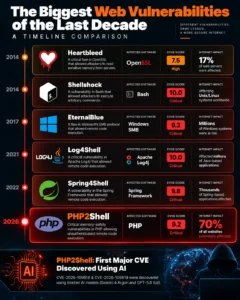
How PHP2Shell Compares to Heartbleed and Log4Shell
| Vulnerability | Year | Software | CVSS | Impact |
| Heartbleed | 2014 | OpenSSL | 7.5 | ~17% of web servers |
| Shellshock | 2014 | Bash | 10.0 | Unix/Linux |
| EternalBlue | 2017 | Windows SMB | 9.3 | Windows systems |
| Log4Shell | 2021 | Apache Log4j | 10.0 | Java applications |
| Spring4Shell | 2022 | Spring Framework | 9.8 | Java apps |
| PHP2Shell | 2026 | PHP | 9.2 | ~70% of websites |
What makes PHP2Shell different:
- First major CVE discovered using AI (Gemini + GPT)
- Broadest practical impact in web history
- Shortest window between disclosure and mass exploitation
- Lowest attacker skill barrier thanks to AI exploit adaptation
The Future of WordPress Security in the AI Era
PHP2Shell marks the beginning of a new cybersecurity era:
1. Faster Vulnerability Discovery
AI dramatically increases both researcher and attacker vulnerability-finding speed.
2. Shorter Patch Windows
Hours matter, not days or weeks.
3. Rise of AI-Powered WAFs
Next-gen WAFs will use AI/ML to detect novel attacks in real-time.
4. Managed Hosting Dominance
Managed WordPress hosts (Kinsta, WP Engine) applied PHP2Shell patches within hours. Shared hosting users waited days.
5. Zero-Trust WordPress Security
Expect MFA by default, automated monitoring, continuous scanning, automated patching.
6. AI-Assisted Defense Tools
- AI malware detection
- AI vulnerability prioritization
- AI incident response assistants
Complete PHP2Shell Disclosure Timeline
| Date | Event |
| August 19, 2026 | Wiz Research discovers vulnerability using AI |
| August 20, 2026 | Unauthenticated RCE confirmed on Drupal |
| August 21, 2026 | Unauthenticated RCE confirmed on WordPress |
| August 24, 2026 | Wiz reports to PHP security team |
| September 21, 2026 | PHP acknowledges and begins coordinated fix |
| October 20, 2026 | PHP announces emergency release |
| October 20, 2026 | Dutch, Finnish, Austrian agencies pull sites offline preemptively |
| October 21, 2026 (14:00 UTC) | Patched PHP released (8.5.12, 8.4.27, 8.3.36, 8.2.35) |
| October 21, 2026 | Public disclosure by Wiz Research |
| October 21, 2026 | Cloudflare, Fastly, AWS deploy WAF mitigations |
| October 21, 2026 | BambooHR, Something Awful take services offline |
| October 21, 2026 | UK NCSC alert; councils and Met Police affected |
| October 22, 2026 | First active exploitation observed |
| October 22, 2026 | Managed WordPress hosts complete patching |
| October 22, 2026 | White House assessing impact |
| October 23, 2026 | Shared hosting providers continue rolling out patches |
| Ongoing | Active exploitation of unpatched sites continues |

Comprehensive FAQs About PHP Vulnerability October 2026
What is PHP2Shell?
PHP2Shell is the nickname for two critical PHP vulnerabilities (CVE-2026-109618 and CVE-2026-109619) disclosed October 21, 2026. Both allow unauthenticated remote code execution and are rated CVSS 9.2 (Critical).
Does updating WordPress fix PHP2Shell?
No. WordPress updates do not patch the PHP engine. Your hosting provider must update the PHP runtime.
Which PHP versions are safe?
PHP 8.5.12, 8.4.27, 8.3.36, 8.2.35 (or later releases in those branches). PHP 8.1 and older have no official fix — upgrade required.
Can my WordPress security plugin block PHP2Shell?
Partially. Plugins like Wordfence, Sucuri, Patchstack have deployed detection and mitigation rules, but can’t fully replace the official PHP patch.
Has my WordPress site been hacked by PHP2Shell?
An unpatched PHP version doesn’t by itself prove compromise. Watch for signs: unexplained files, new admin users, strange outbound traffic, modified configs.
How was PHP2Shell discovered?
Wiz Research discovered PHP2Shell using AI models (Gemini 4 Argon, GPT-5.6 Sol, Wiz Atlas). First major CVE discovered with AI assistance.
What if my host hasn’t patched yet?
- Demand a patching timeline in writing
- Request temporary WAF mitigations
- Consider isolating/offline the site
- Migrate to a security-focused host if your provider delays
Is PHP 8.2 safe to continue using?
PHP 8.2.35 patches PHP2Shell, but PHP 8.2 reaches EOL December 31, 2026. Patch now, plan migration to 8.3/8.4/8.5.
Does Cloudflare protect from PHP2Shell?
Partially. Cloudflare WAF rules deployed within hours of disclosure. Cloudflare CTO called it a “STOPGAP only” — you MUST patch PHP.
Will the PHP patch break my WordPress site?
Minor patch updates (8.3.35 to 8.3.36) rarely break well-maintained sites. Major version jumps (8.1 to 8.3) can cause plugin incompatibilities — test on staging first.
What’s the cost of recovering from a PHP2Shell hack?
| Recovery Method | Cost |
| DIY cleanup | 100–500 |
| Professional cleanup | 200–1,500+ |
| Full site rebuild | 1,000–10,000+ |
| Enterprise response | 10,000–100,000+ |
| GDPR fines | Up to 20M euros |
Conclusion and Action Plan: Act Now to Protect Your WordPress Site
The PHP vulnerability of October 2026 — PHP2Shell / CVE-2026-109618 and CVE-2026-109619 — isn’t just another WordPress security story. It’s a watershed moment marking the beginning of the AI-powered cybersecurity era.
Key Takeaways
- PHP2Shell affects approximately 70% of the internet
- Both CVEs rated CVSS 9.2 Critical with pre-auth RCE
- Updating WordPress alone is NOT enough — PHP must be patched
- Patched versions: 8.5.12 / 8.4.27 / 8.3.36 / 8.2.35
- Government sites worldwide have been pulled offline
- Major companies (BambooHR, Bullhorn, Wikipedia, hosting providers) affected
- Active exploitation is already underway globally
- AI-powered discovery means future vulnerabilities arrive faster
Your Immediate Action Checklist
- Check PHP version — Tools, Site Health, Info, Server
- Contact hosting provider for PHP2Shell patch confirmation
- Full backup of your WordPress site (files + database)
- Apply the PHP patch via hosting panel or server
- Test all critical functionality after patching
- Enable or upgrade WAF (Cloudflare, Wordfence, Sucuri)
- Install security plugin (Wordfence/Sucuri/Patchstack)
- Enable 2FA on all admin accounts
- Scan for compromise signs
- Set up ongoing monitoring
- Document everything for compliance and insurance
- Create incident response plan if you don’t have one
The Bottom Line
If government agencies, Fortune 500 companies, and billion-dollar hosting providers are pulling their sites offline because of PHP2Shell — your WordPress site is NOT immune.
The cost of patching is almost nothing. The cost of ignoring could be your entire business.
Act today. Not tomorrow.
Need Expert Help Securing Your WordPress Site?
Securing a WordPress site against PHP2Shell can be overwhelming — especially if you juggle multiple sites, run a WooCommerce store, or lack a dedicated IT team.
Our WordPress security specialists can help you:
- Audit your current PHP version and hosting environment
- Coordinate the PHP patch with your hosting provider
- Scan and remove any PHP2Shell-related compromise
- Harden your site with WAF, 2FA, SSL, and best practices
- Monitor your site 24/7 for emerging threats
- Backup your site daily with off-site redundancy
- Create your incident response plan
- Train your team on WordPress security
Book a FREE WordPress Security Audit Today
What if my hosting plan doesn’t let me change PHP?
Your options:
- Migrate to Kinsta, WP Engine, SiteGround, Hostinger
- Add Cloudflare WAF (partial protection)
- Install Wordfence Premium
Are WooCommerce sites more at risk?
Yes. Payment data + customer PII = high-value target. PCI-DSS violations can cost $5,000 to $100,000 per month.
Does PHP2Shell affect Elementor or Divi?
Yes. Any WordPress site, regardless of page builder, running vulnerable PHP is at risk.
Which Dutch government sites were affected?
Confirmed: Overheid.nl, Dutch NCSC, Dutch Parliament, DigiD, RIVM, Port of Rotterdam, KNVB, multiple hospitals, and numerous municipal portals.
Did Wikipedia go down from PHP2Shell?
Yes. Wikipedia (MediaWiki) was temporarily taken offline, along with all Wikimedia Foundation-supported systems using PHP.
Were any US sites affected?
The White House issued statements assessing impact. Several US sites temporarily affected. Full impact still being assessed.
Was BambooHR actually hacked?
No evidence of compromise — BambooHR proactively took services offline to apply patches and validate security.
Why did Swiss hosting Cyon go offline?
Cyon (major Swiss web host) took servers offline as precaution — affecting thousands of customer sites — until patches were applied and validated.
Can I avoid PHP2Shell by moving away from WordPress?
No — Drupal, Joomla, MediaWiki, Magento, and all PHP-based CMS are equally affected. The vulnerability is in PHP itself, not WordPress.
How long will PHP2Shell exploitation continue?
Years. Many unpatched sites will remain vulnerable indefinitely — particularly those on EOL PHP versions (8.1, 8.0, 7.x, 5.x).
Will there be more PHP2Shell-class vulnerabilities?
Yes. AI-powered vulnerability discovery is just beginning. Expect similar major CVEs in the coming months and years.
How do I protect my WordPress site long-term?
Follow the 15-layer safeguard guide above: managed hosting, WAF, security plugin, backups, 2FA, updates, hardening, monitoring, incident response plan.
Can I claim insurance for PHP2Shell damages?
Depends on your policy. Many cyber insurance policies exclude coverage for known vulnerabilities you failed to patch promptly. Document everything.
Should I notify customers if my WordPress site was hacked?
Legally required in many jurisdictions:
- EU (GDPR): Within 72 hours
- US states (varies): Usually 30–90 days
- California (CCPA): As soon as possible
- UK (GDPR): Within 72 hours
What if I run multiple WordPress sites?
Patch ALL of them. One unpatched site risks all your sites on the same server/hosting account.
How can I stay informed about future WordPress vulnerabilities?
- Wordfence Blog (weekly roundups)
- Patchstack (vulnerability database)
- WPScan Vulnerability Database
- CISA Known Exploited Vulnerabilities Catalog
- PHP.net security advisories


